レナート   TBFKAYIBYNYAAYB   ﻟﻴﻨﺎﺭﺕ

Sun, 27 Aug 2006

A few updates on PulseAudio

Thanks to Marc-Andre Lureau there's now a jhbuild file for PulseAudio. And there is this (little bit chaotic) Wiki page in GNOME Live! about the relation of PulseAudio and GNOME.

A few weeks ago I wrote a new page for our Wiki where I tried to describe the steps necessary to get the most out of PulseAudio. It's called the Perfect Setup.

A few minutes ago I released PulseAudio 0.9.5 and new versions of the auxiliary tools. The changelog:

One of the nicest new features of PulseAudio 0.9.5 is HAL integration (which has been contributed by Shahms King). PulseAudio will now automatically detect all available sound devices and will make use of them. It supports both hot-plug and hot-remove.

Another nice feature is the GConf integration which allowed us to add another nice application to the PulseAudio toolset: the PulseAudio Preferences utility:
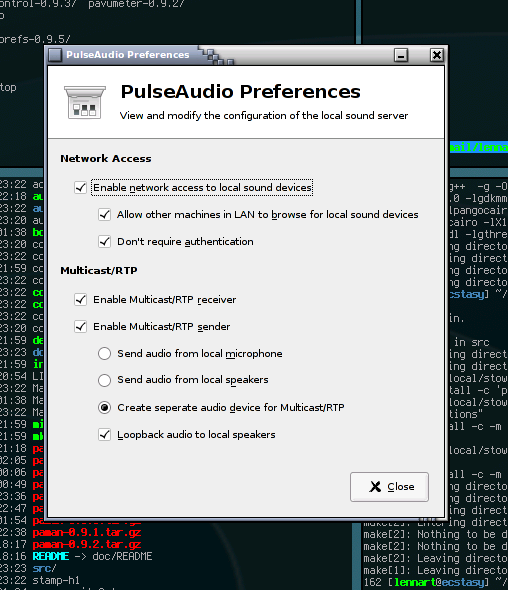
paprefs screenshot

The idea is to have a simple, nice configuration dialog that allows configuration of the more exotic features of PulseAudio which we do not enable by default due to security considerations or to not confuse the user. Right now a lot of features are hidden behind non-trivial configuration file statements. This preferences tool shall make them available for the users which are not so keen on editing configuration files.

Playing around with Valgrind's Massif tool and KCachegrind I did a little bit of memory and perfomance profiling of the PulseAudio daemon. The 0.9.5 release contains a lot of optimizations which are result of this work.

Before:

Massif before

After:

Massif after

These plots show the memory consumption against the time, from starting the server, to playing stream, to stopping the stream and shutting down the server again. The major improvement was actually an update to libsamplerate done by its maintainer to improve the memory handling of that library. (He didn't release an updated version of his library containing the changes shown in the plots yet).

PulseAudio had the nice feature of remembering the playback volume of every application for quite a while. Starting with 0.9.5 PulseAudio it also remembers the output device for every application. Together with an updated Volume Control tool which now allows moving streams between sinks while they are played this can be used to configure a ruleset like "Ekiga always on the USB headset, Rhytmbox always on the external speakers" very intuitively and easily:

pavucontrol screenshot

And here's a final screenshot showing all the tools we currently have for PulseAudio 0.9.5.

PA Screenshot

posted at: 02:19 | path: /projects | permanent link to this entry | 12 comments


Posted by Alan H at Sun Aug 27 05:11:57 2006
Suggestions:

Pulse audio preferences. 
Avoid acronyms like LAN.  Break it down: Local Area Network (LAN).  Network is the keyword. 

"Allow other machines on the Nework to browse for local sound devices"
At a glance this setting looks very similar to the setting just above it.  Maybe there is a good reason for it but if it is not obvious at a glance then odds are it could be made easier and clearer. 

The Gnome Human Interface Guidelines recommend "Don't be negative" ;) and I recommend "Do not abbreviate" which would change the next option to
"Require Authentication" and then you set the default value of the checkbox as needed. 

More acronyms in the dialog, avoid them if at all possible.  Acronyms make intelligent people look stupid, just ask a lawyer/doctor/accountant to throw some of their acronyms at you and prepare to be baffled. 

The Pulse Audio Volume control uses mnenics on the tab labels.  The Gnome HIG recommends against doing this, part of the reason being is it far too easy to end up with conflicting mnemonics. 
Requiring right click is bad for accessibility, and the fact that you have to label it so clearly at the bottom shows you already know how bad it can be for discoverability. 

from the larger screenshot showing various dialogs I see the sink dialog has bold text which is centre aligned.  The Gnome HIG recommends you right align the text, it all fits with how English (and other languages) is written from left to right and how the reader can most easily follow it. 

And one final suggestions and I understand you will probably disagree but only German allows you to put capitals in the middle of words so you should definately need to put a space between Pulse and Audio. 

Look like great software, thanks for writing about it.

Posted by John at Sun Aug 27 05:38:16 2006
This is amazing news. Thanks for the PerfectSetup wiki page also.

I cant wait to see this the default for GNOME!

Posted by MattW at Sun Aug 27 11:08:45 2006
Impressive. Very impressive. Now if only everything used GStreamer...

Posted by Peteris Krisjanis at Sun Aug 27 12:13:00 2006
I am just confused, where is reason to doing this seperately, in special sound server, not in GNOME Mixer, adding missed pieces and fixing bugs? It is just adding additional complexity to all system and drains developer resources, in my humble opinion. However, it is nice that someone does something at least in this front, so I downpay this effort not at all. I just want to know are devs very sure that it won't introduce lot of additional bugs and if it will, then how to deal with that.

Would like to know, just all :)

Peter.

Posted by Lennart at Sun Aug 27 15:16:45 2006
MattW: Why do you ask for everything to use GStreamer? PulseAudio is no way specific to GStreamer. We have a plugin in for ALSA's libasound library which allows you to access PulseAudio through the ALSA libraries much like a normal hardware sound card. In addition we support the OSS API very well. You should be able to run about 90% of all Linux sound applications on top of PulseAudio.

Posted by Lennart at Sun Aug 27 15:21:59 2006
Peteris: GNOME Mixer? Do you mean GSmartMix? PulseAudio is not really comparable with GSmartMix. In addition PulseAudio predates GSmartMix. And eventually PulseAudio will offer some way of integration into GSmartMix allowing volume control of PA with the GSmartMix tools.

The old sound server used by GNOME ("Esound") shows its age, PulseAudio tries to be its successor which does everything right what Esound did wrong.

Posted by Lennart at Sun Aug 27 15:26:34 2006
Alan: thanks for the advices. BTW: German doesn't allow you to put capitals in the middle of words as much as english doesn't. However it's used that way in ads.

Posted by Marius Gedminas at Sun Aug 27 15:41:05 2006
Wow.  I can't wait until PulseAudio makes it into my distro.  Switching output from my local speakers to those connected to a different machine on my LAN in the middle of playback?  Wow.

Can PulseAudio play the same stream on multiple sinks (say, two different machines on the LAN) with proper time synchronization?

Posted by Lennart at Sun Aug 27 15:47:09 2006
Marius: Yes it already can do that for you to a certain degree. However this still leaves some room for improvements.

Posted by Richard Palmer at Wed Nov 15 14:52:34 2006
I am relatively new to Linux and currently enamoured of Zenwalk. Researdh suggests that PulseAudio will enable me to seamlessly integrate RealPlayer, Skype, Gzine etc.

As a former Win XP user I got used to the convenience of being able to switch between running sound applications without difficulty.


Best regards

Richard Palmer

Posted by Tony McNamara at Thu Dec 6 05:41:39 2007
thank you so much for PulseAudio, I use it in Ubuntu Gutsy. All that remains is to get RealPlayer to use PulseAudio. So far I have mplayer,xine (uses xine alsa-plugin), FlightGear flight simulator, vlc, StreamTuner using Audacious, and several more - yes I am a junkie for getting things to work! But really it is so good to not have the sound card blocked!
Thanks again,
Tony

Posted by Konrad at Wed Aug 5 15:21:04 2009
I'm more than confusing with audio in linux, for programmer everything ok, but for normal user there is never one example of basic settings of audio tools!!

Every teaching book in mathematics there is first the explain and than following one example with real figures.

Best regards

Konrad

Leave a Comment:

Your Name:


Your E-mail (optional):


Comment:


As a protection against comment spam, please type the following number into the field on the right:
Secret Number Image

Please note that this is neither a support forum nor a bug tracker! Support questions or bug reports posted here will be ignored and not responded to!


It should be obvious but in case it isn't: the opinions reflected here are my own. They are not the views of my employer, or Ronald McDonald, or anyone else.

Please note that I take the liberty to delete any comments posted here that I deem inappropriate, off-topic, or insulting. And I excercise this liberty quite agressively. So yes, if you comment here, I might censor you. If you don't want to be censored your are welcome to comment on your own blog instead.


Lennart Poettering <mzoybt (at) 0pointer (dot) net>
Syndicated on Planet GNOME, Planet Fedora, planet.freedesktop.org, Planet Debian Upstream. feed RSS 0.91, RSS 2.0
Archives: 2005, 2006, 2007, 2008, 2009, 2010

Valid XHTML 1.0 Strict!   Valid CSS!